
American Airlines’ app lets you see the upgrade and standby list for any flight in the hours leading up to departure. The details of how this works tends to cause some confusion, so in this post I wanted to talk about how to decipher the information on these lists.
American app shows upgrade & standby list 8-12 hours out
American Airlines’ app lets you see the upgrade and standby list for any flight, either eight or 12 hours before the scheduled departure time. There are two main ways you access this:
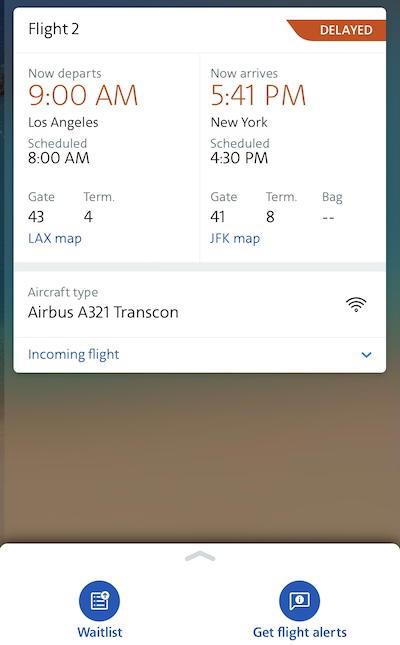
- If you’re not booked on a flight, you can go to the “Flight status” tab, search any flight, and when you select it, you’ll see the “Waitlist” tab, which shows you this information; this will only show up to eight hours before departure
- If you are booked on a flight, just click on the page that shows the flight you’re traveling on, and at the bottom you’ll see the “Waitlist” tab, which lets you access this information; this will show up to 12 hours before departure
No matter how you access it, the waitlist tab will show you both the upgrade list and the standby list for a particular flight. Note that this feature is only available through the American Airlines app, and not through aa.com.
How the American upgrade list works
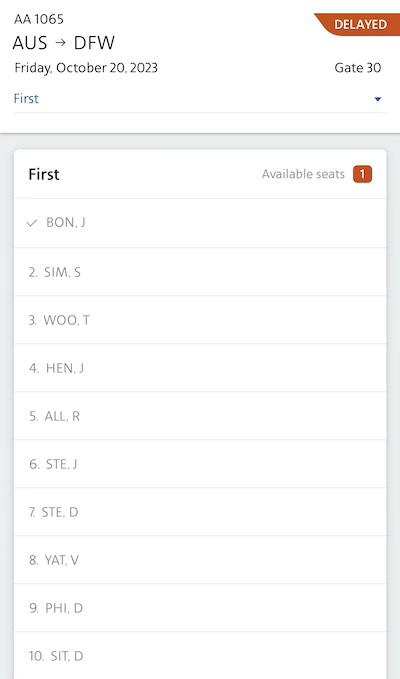
Once you’re on the waitlist tab, it’ll default to showing the upgrade waitlist. The app will show the number of available seats at the top right, and then it will show the upgrade waitlist in order of priority. Here are a few important things to understand:
- The upgrade waitlist only shows people who have already checked in, so expect that the list may be much longer an hour before departure than eight hours before departure; don’t be surprised when your priority falls as the departure time approaches
- If a flight has both a first class and business class cabin (Airbus A321Ts and Boeing 777-300ERs), you’ll see separate tabs for the upgrade list for each cabin, so make sure you’re looking at the right one
- While upgrades can clear in the hours leading up to the flight, at the gate upgrades to empty seats automatically clear 40 minutes before departure (you don’t need to be at the gate, as this is automated); if there are any no shows in a premium cabin, gate agents may come onboard to offer upgrades to the next people on the upgrade list
- Once an upgrade clears, you’ll see a checkmark next to the name (the upgrade list displays the first three letters of the last name, plus the first letter of the first name)
- The number of available seats won’t decrease as upgrades clear at the gate; in other words, if three upgrades clear at the gate and the app shows three available seats, that generally means no seats are left (conversely, you could see upgrades clear with zero seats showing as remaining, in situations where there are no shows)
As far as upgrade priority goes:
- They’re first prioritized based on your elite status; Concierge Key members clear first, then Executive Platinum members, then Platinum Pro members, then Platinum members, then Gold members
- Within each tier, they’re then prioritized by the type of upgrade, with confirmed upgrades (like mileage upgrades and systemwide upgrades) clearing ahead of complimentary upgrades
- Then within each elite tier and upgrade type, they’re prioritized by your rolling 12-month total of Loyalty Points
Generally you can trust that gate agents will follow the correct upgrade order. Back in the day gate agents perhaps sometimes played favorites, but nowadays this is all so automated, and there’s also accountability if order isn’t followed.
You may still see some situations where someone at the top of the list doesn’t get an upgrade, and someone lower down does. Generally this would be because the person at the top of the list refused an upgrade, perhaps because they’re traveling with a companion.
How the American standby list works
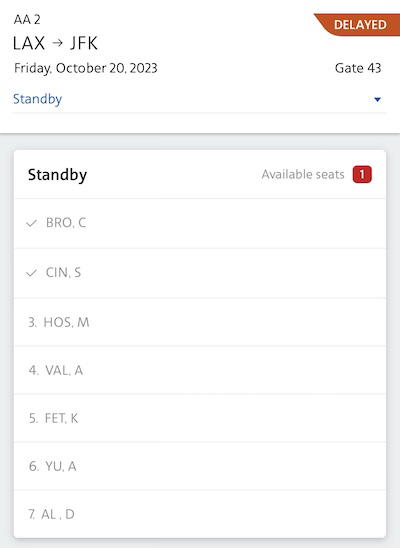
Accessing the standby list in the American Airlines app is easy. Once you’re in the waitlist tab, you’ll see that the upgrade list shows first. Just go to the drop down menu, and click the “Standby” button, and you’ll see the standby list.
I find the standby list to be super helpful, since it shows you how many seats are still empty in economy. This gives you a good understanding of what your odds of clearing a standby are. It’s also generally useful even if you’re confirmed on a flight, so you can get a sense of how busy the flight will be, if they’ll run out of overhead bin space, etc.
Note that while clearing the upgrade list is an automated process, clearing the standby list is a manual process. That’s because not all people on the standby list necessarily show up for the flight, so the gate agents need to manually call them to be sure that the passenger is still interested in taking a particular flight.
Another thing to understand is that the order in which the standby list clears is a bit more nuanced than the upgrade list. That’s because you may have revenue customers on the standby list (those who paid for tickets, whether with cash or miles), as well as those traveling non-rev (including employees, and friends and families of employees):
- Generally speaking, revenue customers clear standby before non-rev customers
- However, non-rev customers may be eligible for different cabins than revenue standby customers
- For example, if you’re a revenue customer and booked an economy ticket, you’d only be able to clear into economy; meanwhile an employee would be able to clear into first or business class, on a space available basis (after all upgrades have cleared)
- If economy is full and a premium cabin is empty, this means an employee who appears lower on the list may clear standby onto a flight ahead of a revenue customer who is higher on a list, simply because they’re eligible for those premium seats
- Furthermore, sometimes employees will travel in jump seats, so they may be at the very bottom of the standby list, but they end up sitting in a seat that a customer couldn’t otherwise sit in
My point is simply that there are plenty of legitimate situations where the standby list may not appear to clear in order, and that largely comes down to the complexities around standby priority.
Bottom line
In recent years, American has significantly improved its upgrade and standby list capabilities in the app, which is much appreciated. The airline still lags Delta and United in this regard, but the situation is much better than it used to be.
Even if I’m already confirmed on a flight in the cabin I want to travel in, I always like to keep an eye on these lists — it’s an interesting data point to see how many people are on the upgrade list, and I also list to see how full the flight is in general.
What has your experience been with American’s upgrade and standby lists?


Membership is free and takes no more information than commenting as a guest. Earn status points for good contributions, and see fewer ads as your status grows.