
International travel is really complicated nowadays, between constantly changing rules, testing requirements, and endless pre-travel forms. In a previous post I shared my experience with the UK passenger locator form, which I needed to complete in order to even transit the UK enroute to Greece.
In this post I wanted to talk about VeriFLY, which I recently used for the first time. Prior to using it I was confused about what exactly it was, and I’m sure I’m not the only one, so hopefully I can clear things up a bit.
What is VeriFLY?
On the most basic level, VeriFLY is a free app that can help simplify the international travel experience. VeriFLY works with select airlines to help verify travel credentials (like coronavirus test results and passenger locator forms) for select destinations, in order to make the check-in experience more seamless.
Use of VeriFLY is not mandatory for travel on any airline, but rather it’s a tool intended to save you (and the airline) time when you’re at the airport.
Here’s how VeriFLY describes itself:
VeriFLY compiles real-time wellness information from self-certified health questionnaires and/or diagnostic COVID-19 test results from over 20,000 performing labs and provides digital badging, proof of test status for both antibody or viral testing, and (in the future) proof of vaccine. Our HIPAA-compliant solution removes the burden from organizations to structure agreements for lab results in multiple locations.
Users enjoy countless ways to acquire, verify, and assert their credentials—proof of health status, age, enrollment, citizenship, membership, reservations, and more.
VeriFLY won’t be useful for all airlines and/or destinations — the service partners with American Airlines and British Airways for international travel, but not most other airlines. You can find all the details about eligible VeriFLY destinations at these links:
- Find American Airlines’ eligible VeriFLY destinations here
- Find British Airways’ eligible VeriFLY destinations here
If you’re on a flight eligible for VeriFLY, chances are the airline will email you prior to travel promoting you to use VeriFLY.
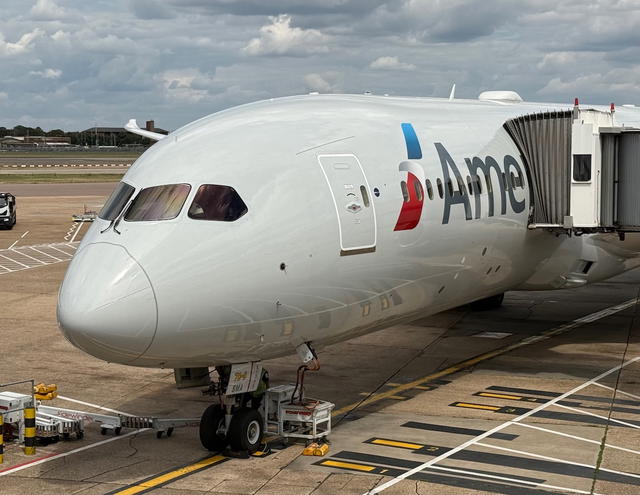
Perhaps this is easiest explained in the form of an example. I was flying from Charlotte to London on American Airlines, and London to Athens on British Airways. American Airlines partners with VeriFLY for flights to the UK.
By using VeriFLY, I was able to have my passenger locator form and negative coronavirus test result verified before I even got to the airport — when I got to check-in I just showed the agent my digital pass from VeriFLY, and that’s all that needed to be done.
We’ve heard the concept of a “vaccine passport,” so think of this (as of now) as more of a “testing and form passport.”
Why is VeriFLY useful?
You might be thinking to yourself that this sounds like a lot of effort for little reward. For travel to the UK, VeriFLY essentially helps you verify that your passenger locator form is complete, and that you have a valid negative coronavirus test.
Shouldn’t that just take a check-in agent a minute to verify, and therefore VeriFLY is useless? While you’d hope so, that’s not the reality:
- The check-in agent that helped me explained that they have a ridiculously convoluted process that’s required for passengers who don’t use VeriFLY, and he said it can take them 45 minutes to complete (I’m guessing that was an exaggeration, but still)
- I’m inclined to believe that’s not too far off, because it took the check-in agent about 20 minutes to properly document in our record that we could travel to Greece; and this wasn’t because he was clueless, but rather he was typing in our record almost the entire time
If you travel internationally:
- Arrive at the airport really, really early, because at the counter next to me five people in a row missed their international itineraries
- If possible use a service like VeriFLY that verifies your credentials in advance, because you’ll make your life easier, as well as the life of the check-in agent easier
How do you use VeriFLY?
I’ll share my experience using VeriFly for an American Airlines flight from Charlotte to London. I’ll talk about the process, and also share why I found the app to be rather clunky.
To start, you’ll want to go to the app store and download the VeriFLY app. You’ll then go through the “onboarding” process. This involves sharing basic details, before actually sharing details for a specific trip.
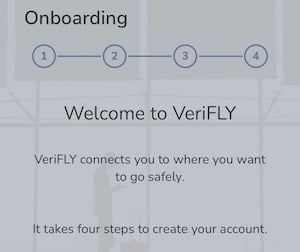
This involves sharing your first name, last name, and email address.
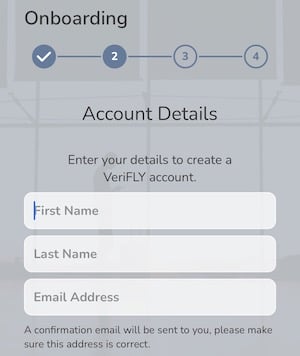
You’ll also have to take a photo of yourself, which will be what displays on your “mobile pass” when you’re done. I found the process of taking a picture through the app to be frustrating — sometimes the picture button just wouldn’t work, while other times the app rejected my picture.
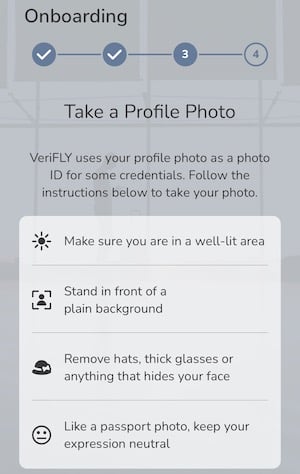
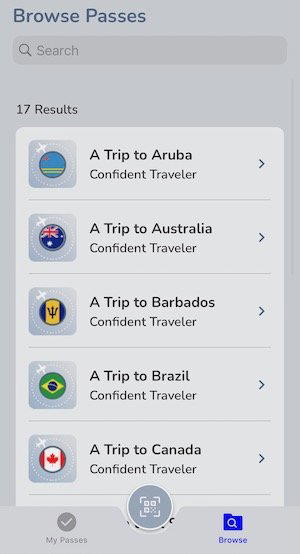
With those details entered, you can start to create a “pass” for the trip you’re taking. VeriFLY can be used for several destinations, from Aruba, to Brazil, to the United Kingdom. Since I was traveling to the United Kingdom, I selected that option.
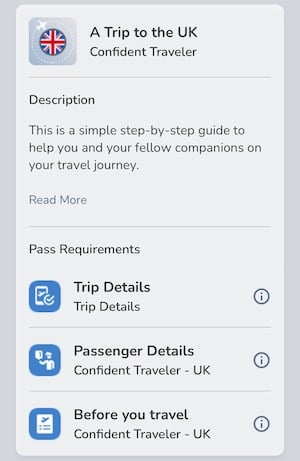
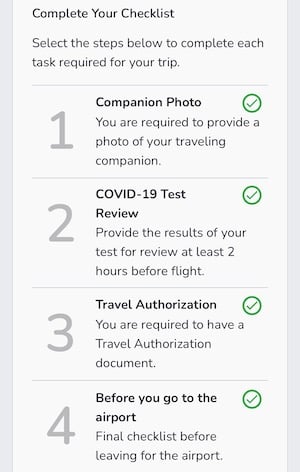
The next page outlines the process, which is that you have to enter basic trip details, then you have to enter passenger details, and then you have to go through the pre-travel checklist.
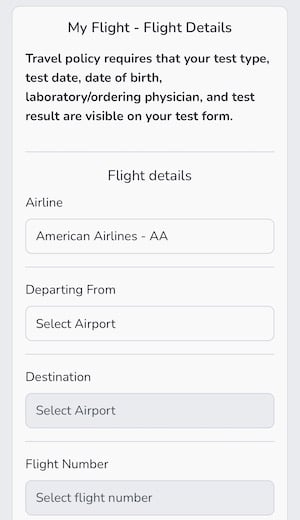
To start, I had enter my exact flight details. Since VeriFLY partners with American Airlines, I only had to enter the basic details (like the departure airport and destination), and then the app automatically recognized the flight number, flight times, etc. I also had to enter my passport details.
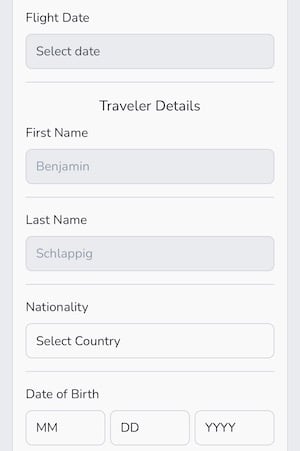
The next thing about VeriFLY is that you can add several companions to the same trip, including adults. You do need pictures and passport information for each person, but at least you don’t need to create separate accounts. This differs from the UK passenger locator form, where you have to create a separate account for each person.
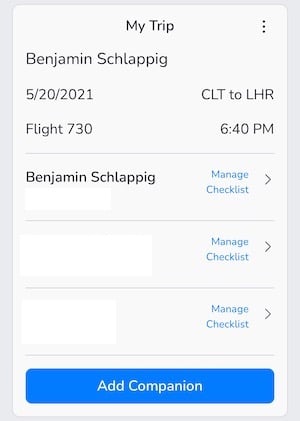
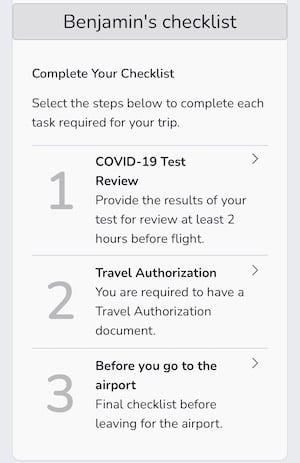
From there you have three main steps:
- You need to upload your negative COVID-19 test result, which needs to be done at least two hours before departure
- You need to share details of your travel authorization, which in this case would be the UK passenger locator form
- You need to go through a final checklist before leaving for the airport, which needs to be done within 24 hours of departure
To submit your COVID-19 test result you’ll need to:
- Confirm that your date of birth is displayed on the test form
- Select the type of test you took
- Share the test date
- State whether the exact test time is stated on the document; if it’s not, 8AM will be used as the presumed time of testing
- Confirm that the lab you used is stated on the form
- Confirm that your test result is negative
- Upload the actual test result
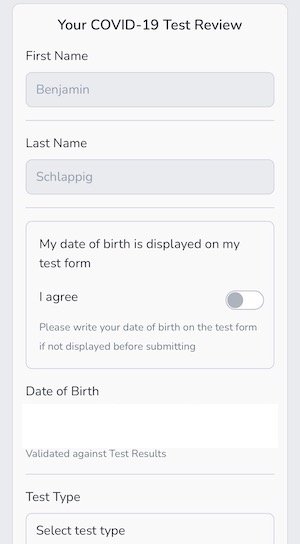
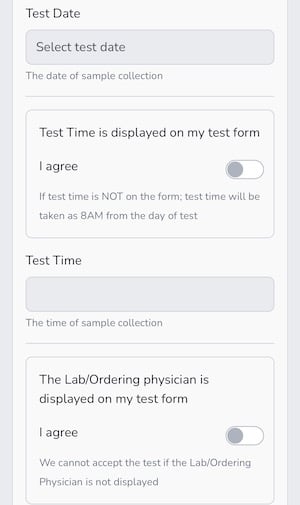
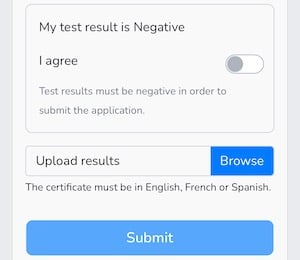
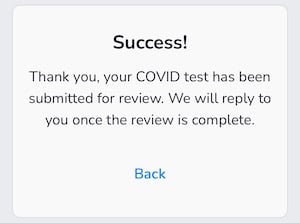
Understandably there’s a manual review process here, though this is part of the process I found to be frustrating. My mom’s test was verified within two minutes, while mine took 16 hours to be approved, and that only happened a couple of hours before we headed to the airport. I’ve heard of others just having their test stay in the “pending” state without anything happening, which negates the purpose of this.
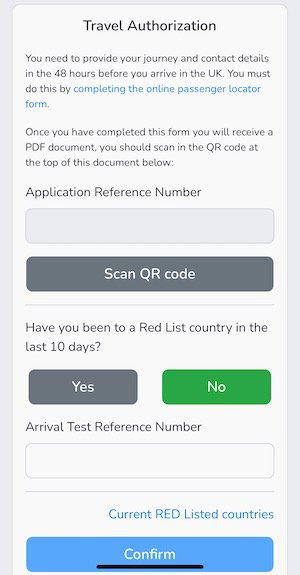
To complete the travel authorization:
- I had to enter the application reference number on my UK passenger locator form
- Separately I had to scan the QR code on my UK passenger locator form
- I had to confirm that I haven’t been to a UK red list country in the past 10 days
Lastly, within 24 hours of departure and before going to the airport, I had to go through the pre-travel checklist, confirming that I have a valid passport, that I have a copy of my negative COVID-19 test, that I have a copy of my UK passenger locator form, and acknowledge I’d have to wear a face covering when flying.
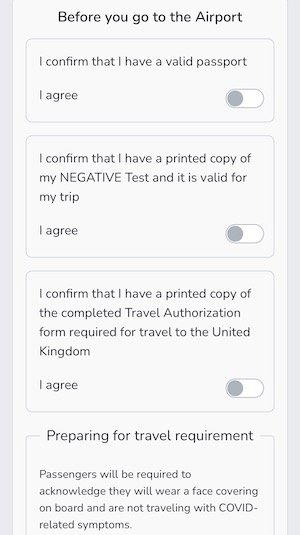
At that point the checklist was complete.
With everything done, I was essentially given a “mobile badge” with my picture and a green check mark next to it, which means you’re clear to travel (I’m blurring the picture because I was getting so pissed off with VeriFLY’s useless photo taking feature that I’m basically scowling).
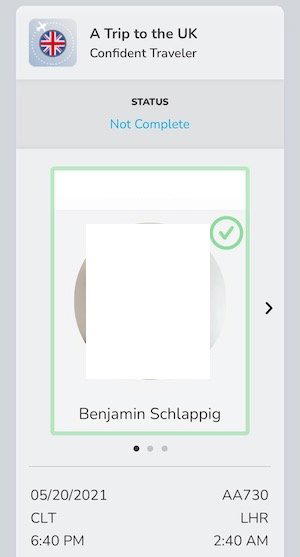
At the American Airlines check-in counter the agent was thrilled to see that I had completed the VeriFLY process. I just had to show him that “mobile badge” with my picture and the green check mark, and that was all the verification that was needed for the UK.
The check-in process still ended up taking about 20 minutes, as our documents had to be verified for Greece, which doesn’t participate in the VeriFLY program.
Bottom line
International travel is ridiculously complicated nowadays, between entry requirements, testing requirements, and paperwork. VeriFLY is a free travel verification service that partners with select airlines for select destinations.
While use of VeriFLY isn’t necessary, it does make the check-in process significantly easier. I recently used it when flying American Airlines from Charlotte to London, and VeriFLY was able to verify my UK passenger locator form and negative coronavirus test before going to the airport.
While the app is clunky and not amazing, it is something I’d recommend using if prompted to do so by your airline. It will eliminate some of the stress on the day of travel, and will also reduce the workload for check-in agents.
If you’ve used VeriFLY for international travel, what was your experience like?


Membership is free and takes no more information than commenting as a guest. Earn status points for good contributions, and see fewer ads as your status grows.