
Travis is still recovering from his mountaineering accident. This is another blog entry he had previously prepared.
We flew United recently for a long weekend trip to visit the grandparents. The flight there was completely uneventful, but the trip home was on one of the A320s that has the new onboard streaming IFE.
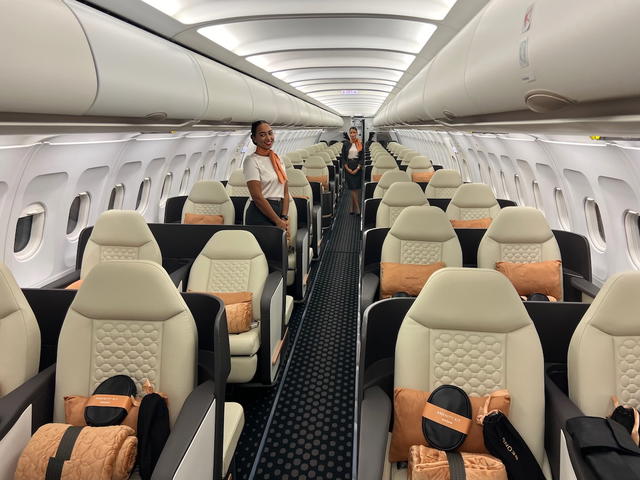
I’ve had mixed feelings about the move to replace screens with content that you can stream to your personal device. On one hand, the tech geek in me loves the concept — it’s just flat out cool. Of course it also saves weight, and weight is fuel, and fuel is money so the airlines like it. I get that too.
But I’m also fearful that this is just another “nickel and dime” opportunity for the airlines. I’m not a fan of having to pay for something (entertainment) that I used to get for free. And what happens to those without devices or those who can’t figure out how to get them to work?
At any rate I was excited to try out the new service.
I didn’t realize our flight was going to be equipped with streaming IFE, and only found out about as the purser was making the pre-departure announcement. She mentioned that PC’s and Apple devices were supported, but that the latter would require the new United app…. oh crap, I still had the old one. Sometimes I can be lazy like that — if it’s working, why bother updating it?
I frantically started the update process as the plane was pulling out of the gate! There I sat, nervously watching the progress meter and, for a rare time in my life, hoping we were 15th in line for take-off. We weren’t. As we turned onto the runway and started our roll, however, the download completed, just in the nick of time. I was ready to try out some streaming IFE! Wahoo. (Yes, I was supposed to have my phone in airplane mode during that time — glad we didn’t crash!)
Once we crossed 10,000 feet, the Wi-Fi was activated, I logged into the app, and located the IFE. The screen explained that the IFE didn’t require the purchase of a Wi-Fi session – it was free for a limited time, sponsored by the MileagePlus Explorer Card. There were 156 movies and 36 TV shows, including 33 kids movies and 8 kids TV shows. That’s an impressive library. I asked my son what he wanted to watch — Cinderella it was.
I then pulled out my laptop to see if I could get the streaming entertainment to work on the laptop. First I connected to the Wi-Fi network. The entertainment tab was prominently displayed adjacent to the flight information and internet tabs. I selected Karate Kid which prompted me to download the Panasonic DRM plugin. (I was momentarily worried that this would require me to buy an internet session, but to my surprise, the plug-in was served up automatically.)
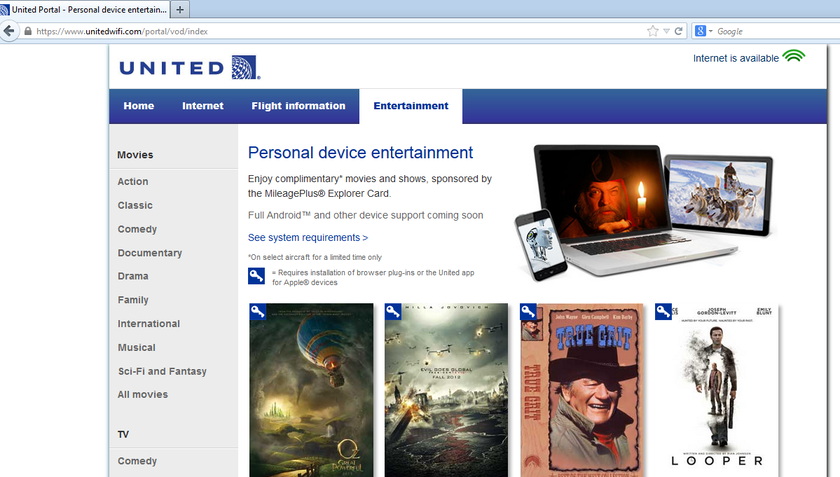
And with that, I was watching a movie on my laptop.
I successfully tested the service in both Firefox and Chrome. I tried to watch one of the movies that does not require the plug-in (or app) – these are denoted by the lack of a little ‘key’ icon in the upper left corner – but just got a black screen instead. These seemed like mostly foreign films and not something I would probably normally watch anyway. I expect that had I tried one of these after installing the plug-in, they would have played without issue.
The streaming IFE worked just OK – it seemed like every 15 minutes or so my iPhone would drop the connection and the movie would stop.
In theory, there is a ‘resume’ button that should make starting your movie back up where you left off easy, but sometimes it wasn’t there. So I would have to scrub through the movie and guess where to start it again. (Of course, I always guessed wrong, a fact that my son would quickly broadcast to the front half of the plane!)
These glitches are annoying, but the service is still being tested so hopefully it will improve. If I was paying for it, I would be disappointed, but for free, it’s really good.
My wife had similar issues watching a movie on her laptop – it seemed that it would hang occasionally in full-screen mode, though performed better when played in a smaller window. (This could also be attributed to memory limitations of her laptop.)
I’m horrible at pop culture so I won’t comment on the quality of the selections. With nearly 200 titles though, it seems you’ll find something to watch.
The real issue is that this is a BYOP affair – Bring Your Own Power – because United’s A320 fleet does not have any power ports. This posed a minor problem for me because my iPhone battery was at about 22% at the start of the flight (don’t ask why!). Fortunately, my laptop was mostly charged so I used it to power my iPhone.
The other issue at the moment is that Android devices aren’t supported. We travel with a Galaxy Tab 3, a Kindle Fire, an iPhone, an Android phone, and two Windows laptops. (More on our computational arsenal in a future post.) That meant that of our 6 devices, only 3 could access the service right now. United says they’ll be supporting the Android platform soon. We shall see.
For now, I’ll give it a thumbs up. The technology works pretty well given its state of deployment. It’s obviously a great value at the present. I just wish we could have this option and the seat back IFE. I suppose I like to have my cake and eat it too.
Have you tried out United’s streaming IFE yet? Did you experience connection issues?


Membership is free and takes no more information than commenting as a guest. Earn status points for good contributions, and see fewer ads as your status grows.