How To Select Etihad Seats Online

One of the awesome things about this hobby is that I learn something new every day. And my lesson for today is how to assign Etihad seats online, courtesy of reader RH.
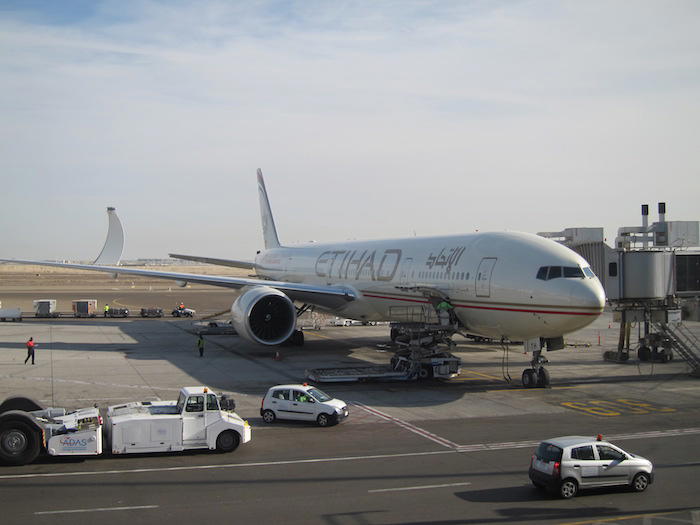
Etihad-777

I’ve always only booked Etihad award tickets using American AAdvantage miles, and I’ve been under the impression that you can’t select Etihad seats online when booking through a partner airline. So my strategy has always been to ask for the Etihad record locator when booking the ticket with American, and then phoning up Etihad for the seats.
That’s an easy enough process, since when you phone up Etihad the phone prompt asks if you’re in first or business class, and if you are, the hold times are virtually non-existent.

That being said, I still like to avoid getting on the phone whenever possible, so love the below trick.

How to select Etihad seats online

Step 1: Figure out your Etihad record locator

If booking through a partner airline I always request the Etihad record locator at the time I ticket my reservation. Alternatively you can call back and request it. It should be a six letter code.

Step 2: Log into your booking on etihad.com

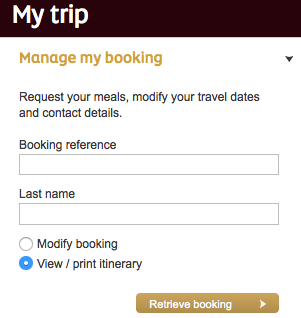
On Etihad’s homepage you’ll see the “My trip” section on the right side. Enter your booking reference and last name, and click on the “View / print itinerary” button.
Etihad-Manage-Booking

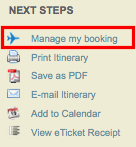
From there you’ll be brought to a page on virtuallythere.com. On the right side of that page, push the “Manage my booking” button.
Etihad-Manage-Booking-1

Step 3: slightly modify the URL

Up until this point there’s not actually the option of changing seats. So after clicking on “Manage my booking” you’ll be brought back to a page on Etihad’s website.

Once you’re on that page, paste the below URL into your browser:

https://booking.etihad.com/SSW2010/EYEY/ancillaries.html?viewReloc=XXXXXX

Except you need to replace the “XXXXXX” in the URL with your six letter Etihad confirmation code.

So if your confirmation code were “ABCDEF” you would enter the following URL:

https://booking.etihad.com/SSW2010/EYEY/ancillaries.html?viewReloc=ABCDEF

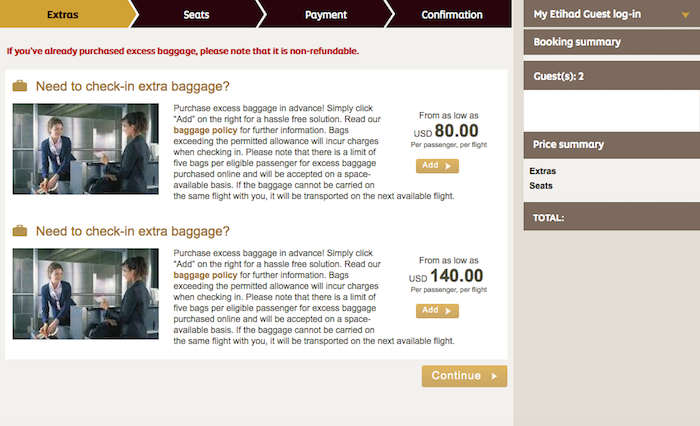
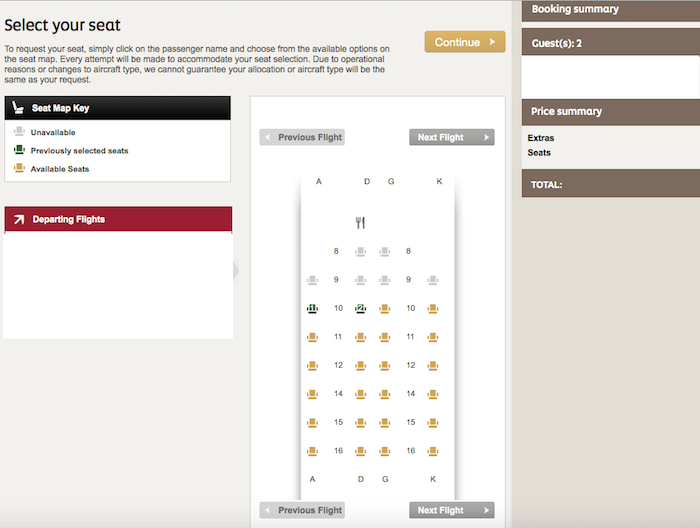
From there you’ll be brought to a page where you can manage various aspects of your booking, including extras, seats, etc.

The first page will give you options for extra bags…
Etihad-1

While the second page will give you the option of selecting seats…
Etihad-2

Bottom line

This isn’t life changing since Etihad has one of the better call centers for selecting premium cabin seats. That being said, why pick up the phone when you can do the same thing online?

Hopefully they eventually introduce the functionality to reserve seats online for all bookings more easily.

Conversations (97)
The comments on this page have not been provided, reviewed, approved or otherwise endorsed by any advertiser, and it is not an advertiser's responsibility to ensure posts and/or questions are answered.
Comment as a member

Membership is free and takes no more information than commenting as a guest. Earn status points for good contributions, and see fewer ads as your status grows.

Type your response here.

If you'd like to participate in the discussion, please adhere to our commenting guidelines. Anyone can comment, and your email address will not be published. Register to save your unique username and earn special OMAAT reputation perks!

  1. Loading comments…
Recent Comments
The latest from the OMAAT community.

The comments on this page have not been provided, reviewed, approved or otherwise endorsed by any advertiser, and it is not an advertiser's responsibility to ensure posts and/or questions are answered.

Randy Guest

It seems this is still a problem in 2023. I booked an award flight on American for Etihad and there is no way to reserve seats ahead of check-in in the android app or multiple browser types on the laptop or phone even using this url trick. I had to pay for my seat selection using the Etihad chat. Etihad charges $30 for their cheapest seat if you reserve it before the check-in time. Also, my wife booked the same Etihad flight using Aeroplan and she could not reserve her seat either without working with a Etihad representative. Finally, even after paying for our seats with the representative, viewing the booking makes no reference to our seat number. I only have the representatives word on what are seat locations are. This is our first time flying Etihad. I thought Etihad was a superior carrier. There software reminds me of Turkish Airlines....

0
‼ 0
charlotte Guest

@Thomas / Talent Hacker: were you able to book the seats? I booked via a partner airline and tried all of the options listed above, but nothing works. I can't select seats in the app, not via the mobile website, not via the link where you change the booking reference... I contacted customer care but they say I can only pick seats upon check in. Any other solutions that may work? Would be great to hear this:)

0
‼ 0
Thomas Guest

@Talent Hacker: Unfortunately, it states that the booking can not be changed. Same result with Chrome, Firefox, Edge, and Internet Explorer. So far the mobile app was the only way where I was allowed to make changes. Still just seats for one person have been saved, even seat assignments for both passengers have been made.

0
‼ 0
Talent Hacker Guest

@thomas - you can resolve this issue by accessing the mobile version on your desktop using m.etihad.com and then select seats. Your best bet is to use Google chrome.

0
‼ 0
Thomas Guest

Have a slightly different problem with seat reservation ... booked award for two persons in First with American for Feb/20. Via Call center as well as Manage by booking via etihad.com, I am notified that seat reservations are not possible at all for that booking. Thanks to this post and the last comment, via mobile app I am able to make seat reservation without any charge and it also shows the seat reservation on etihad.com web page. Finally, also SeatAlert shows the seat being occupied after reservation. So far, so good .... buuuuut ... seat reservation is only made for one of the two passengers on the booking reference. On mobile app in the travel summary it states both have the same seat assigned (and actually my spouse is shown even twice). Same situation on both legs LHR-AUH (A380) and AUH-SYD (B777). I can assign both passengers different seats, but finally only one seat reservation is saved. Anyone knows how to fix that? Like to make sure we have 3A/4A appartments on the A380 and middle seats on B777.

0
‼ 0

Save posts to read later

Saving posts is a member feature. Become an OMAAT member to build a reading list you can come back to from any device.

Become a member
Meet Ben Schlappig, OMAAT Founder
5,883,136 Miles Traveled

43,914,800 Words Written

47,187 Posts Published