
The Chase Freedom Flex® is one of my favorite no annual fee credit cards, as it offers 5x points in rotating quarterly categories, for up to $1,500 of spend per quarter. Most people use this as a cashback card, meaning the 5x points really translates into 5% cashback in these categories.
However, in conjunction with cards like the Chase Sapphire Preferred® Card, Chase Sapphire Reserve® Card, and Ink Business Preferred® Credit Card, points earned on this card can be converted into Ultimate Rewards points, and be transferred to the Ultimate Rewards airline and hotel partners. Since I value one Ultimate Rewards point at significantly more than one cent, that’s my preferred use of those points.

One thing I’ve always found odd is how tough Chase makes it to track your progress in a given quarter. Last July I wrote a post outlining how to look up your progress towards the $1,500 bonus limit in a given quarter. While there was a small progress bar on Chase’s website, you had to actually inspect the element of the webpage to see your exact progress.
As noted by Doctor Of Credit, Chase has now made it easier to track your 5x points progress in a given quarter with the Chase Freedom. Just log into your Ultimate Rewards account and go to the Rewards Activity page, and at the bottom you’ll see that it now breaks down your progress for the quarter for the 5x points category.
The new tracker is fantastic, and makes it much easier to figure out how you’re doing.
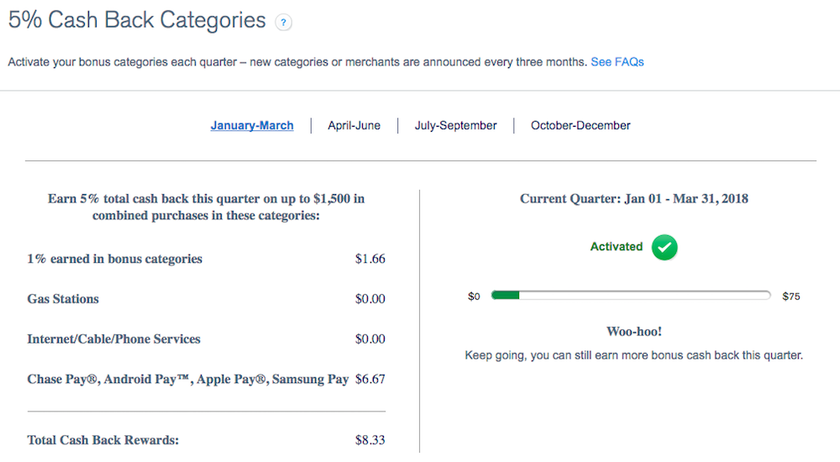
As a reminder, this quarter the card is offering 5x points for mobile payments (Chase Pay, Android Pay, Apple Pay, and Samsung Pay), gas stations, internet, cable, and phone services.
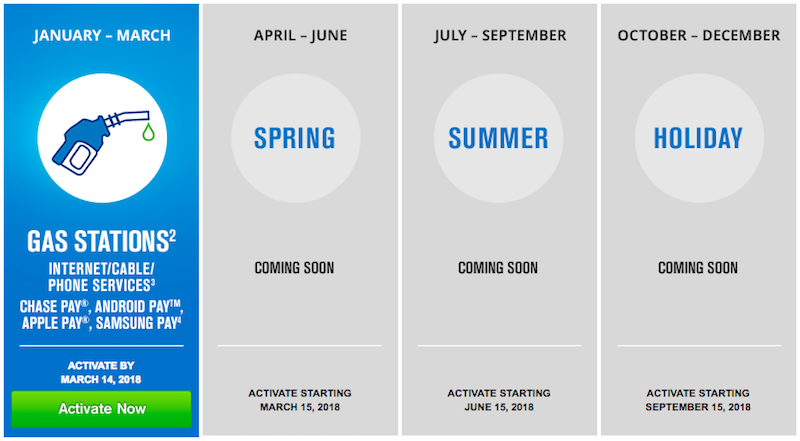
As I’ve explained, I’m maximizing this category by using the mobile payment option. It’s easy to add Apple Pay to things like Uber, Postmates, etc., which really will make the points add up quickly.


Membership is free and takes no more information than commenting as a guest. Earn status points for good contributions, and see fewer ads as your status grows.