
If you’ve flown through a US airport recently, you may have noticed that security wait times are in some cases getting long. Some TSA checkpoints simply aren’t staffed to handle the influx of travelers, though the TSA is working on hiring thousands of people ahead of the summer travel rush.
Well, one major US airport is currently running an innovative pilot program that could decrease airport security wait times.

The new SEA Spot Saver program
Seattle Tacoma Airport has launched the SEA Spot Saver program, which allows you to reserve a time that you want to clear security, and it’s intended to decrease the amount of time you have to wait.
This program is initially being offered daily from May 4 through August 31, 2021, and it’s available from 4AM until 12PM. The program is completely free for passengers, and it’s intended for those who don’t have access to any priority screening options, like TSA PreCheck and CLEAR.
How does the program work? It depends on whether you’re flying Alaska Airlines or another airline.
If you’re flying Alaska Airlines:
- You can schedule your appointment up to 24 hours in advance or sign-up once you arrive at the airport by scanning the QR code on SEA Spot Saver signs throughout the airport
- You will receive a QR code that you can use when you arrive at your scheduled time, which will be emailed to you
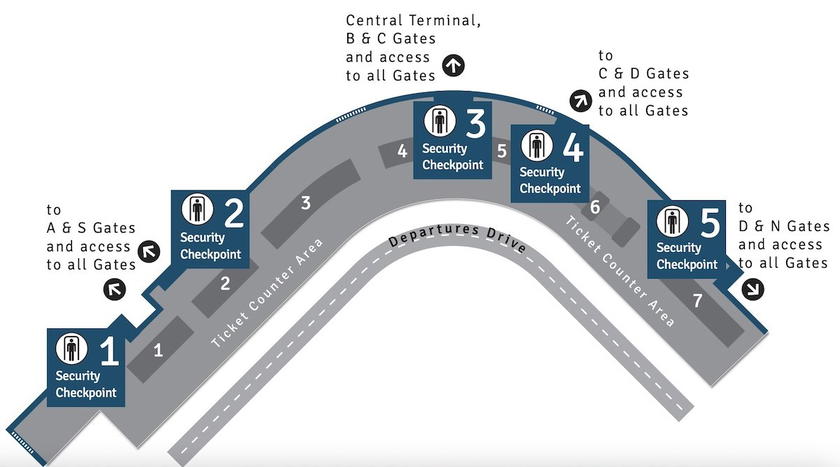
- Then you just have to head to the TSA Checkpoint 5 at your scheduled appointment time (there’s a 15 minute grace period); this is closest to the C, D, and N gates
If you’re flying another airline:
- Once you arrive at the airport head to Checkpoint 2 and scan the QR code, or text “ready” to 833-435-0591 once you’re in the terminal; there’s no option to make an appointment in advance
- You’ll then get a message asking how many people are in your group, and after that you’ll be given your estimated wait time; you can reply “update” at any time to check your place in line
- You’ll be informed at the five minute mark when you’re ready to be screened
- There’s no option to schedule your appointment in advance
- You can use Checkpoint 2, which is closest to the A, S, and B gates
- These passengers can’t make advance reservations, but rather have to add their names to the list once they’re at the airport
- Once you get confirmation that it’s your turn, simply show airport staff at the line your confirmation text
This could be awesome (if well executed)
Assuming it’s well executed, this seems like a great concept, as it’s a win-win-win:
- People won’t have to spend as much time in line, but rather can have a seat and get some work done, go shopping, use the bathroom, etc.
- This will be great for landside retailers, since people usually standing in line could instead be in stores
- This is great for the TSA in terms of managing the flow of passengers
Unfortunately I suspect good execution of this is a big “if.” Or at a minimum, I doubt this can be scaled well:
- The same number of people will be screened no matter what, the question is just how you can best manage the flow of people into lines
- You want enough people in line so that there are no gaps, but not so many people that dozens (or hundreds) of people are waiting unnecessarily
- If this becomes popular, I could see people adding themselves to the list before they get to the airport (based on knowing the phone number to text), and that could lead to no-shows and make it hard to manage expectations
I’d be curious to hear some firsthand reports of this as it launches.
Bottom line
SeaTac Airport is trialing a new “SEA Spot Saver” program, intended to allow people to reserve their TSA screening time. Some passengers can reserve spots up to 24 hours in advance, while others can reserve a spot when they get to the airport.
The idea is that this program allows you to multitask — rather than waiting in line you can hang out somewhere else in the terminal, which I’m all for. But like so many things in life, this all comes down to execution.
What do you make of the SEA Spot Saver program? Do you think this has potential?


Membership is free and takes no more information than commenting as a guest. Earn status points for good contributions, and see fewer ads as your status grows.