
Yesterday I posted about United bringing back “Expert Mode” after removing the functionality a few weeks ago. On that post reader MM asks the following:
Can the newbs get a tutorial on understanding “expert” mode and the supposed benefits?

Of course! For those of you not familiar with “Expert Mode” it’s basically a feature by which you can see availability in various fare classes for United flights. In order to use it you have to go to this page and opt-in while logged into your MileagePlus profile.
Once you’ve opted in simply search for any flight as you usually would. For example, I searched for Newark to Los Angeles on October 5.
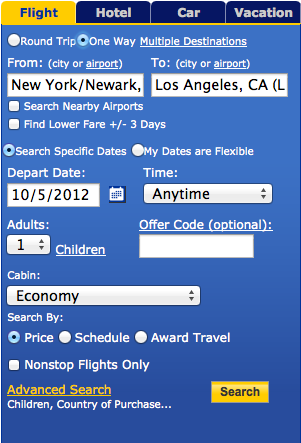
Once you find the flight you want click the “Fare Class” text which appears at the far right of the flight information.

Once you click it a bunch of numbers and letters will show up.
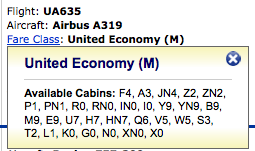
As you can see there are always letters with numbers next to them. The number next to the letters is the number of seats available in that “bucket.” The highest number you’ll ever see is “9,” so even if the flight is completely empty you’ll never see more than “9” seats appear at once.
The breakdown of fare buckets in this case is as follows:
- F, A, P, and Z are paid first/business class fare buckets (in descending order). As you can see above the flight is “F4,” meaning there are four first class seats for sale, and the lower the fare class, the fewer of those seats they’re willing to sell at that price.
- Y, B, M, E, U, H, Q, V, W, S, T, L, K, and G are paid coach class fare buckets (in descending order). As you can see the flight is “Y9,” meaning there are at least nine coach seats for sale, and the lower the fare class, the fewer of those seats they’re willing to sell (for example, they’re only willing to sell one seat in the “L” bucket and no seats in the “K” bucket).
- R is the bucket for upgrades from coach to the next class of service (first class on a two cabin plane, or business class on a three cabin plane). As you can see the flight is “R0,” meaning there’s currently no confirmable upgrade space, which isn’t surprising given that only four seats are left for sale. As a result any upgrades would be waitlisted at this point.
- While it’s not applicable here, “ON” is upgrade space from business to first class on a three cabin plane, so that’s the bucket you would look for if you wanted to upgrade from business to first class.
- “O” is Star Alliance first class award space, “I” is Star Alliance business class award space (though on two cabin flights, like this one, first class would book into the “I” bucket), and “X” is Star Alliance coach award space.
- “ON” is additional first class award space for Platinum elites and up, “IN” is additional business class award space for Platinum elites and up, and “XN” is additional coach award space for all elites. As you can see with the above example, there isn’t any extra space in any of those buckets on this flight.
- For non-elites “FN” is standard first class award space, “ZN” is standard business class award space (again, domestic first class books into this bucket), and “HN” is standard coach award space. For elites standard first class award space is “FN,” standard business class award space is “JN,” and standard coach award space is “YN.”
So why is this useful?
- It gives you an idea as to whether there’s any confirmable upgrade space for the flights you’re looking at, and also how likely your upgrade is to clear at your “window.”
- It gives you an idea of how much availability United is releasing in each “bucket,” which gives you a good idea of whether it’s important to lock in a ticket right away or whether you probably have some time to make a decision (though obviously availability can change rapidly even if a flight appears wide open).
- It gives you a good idea of how full your flight is and whether it might need volunteers.
Hope that answers your questions, and if you have any others, let me know!


Membership is free and takes no more information than commenting as a guest. Earn status points for good contributions, and see fewer ads as your status grows.