
On Thursday I recommended those encountering phantom Cathay Pacific award space try using the Japan Airlines website to search for award space, and have received several questions about how to use the JAL award search tool.
To begin, you’ll need to register for a Japan Airlines MileageBank account, though you don’t need miles or account activity in order to search.

Assuming you want to search for award availability on OneWorld partner airlines, once you’ve logged in to your account, select the link for “JMB Partner Airlines Award Ticket Reservation” on the left-hand side.
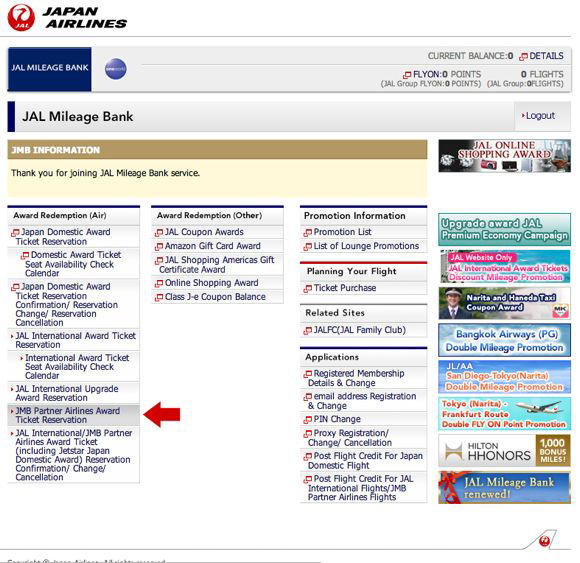
The JAL tool doesn’t show award space for all their partner carriers, but they are an accurate source for award availability on American Airlines, British Airways, Cathay Pacific, and Qantas.
The interface is really clunky, however, so the Japan Airlines site is typically not my preferred method for searching OneWorld award space. I find it more useful for “verifying” space than anything else, since it’s typically accurate. So I usually search award space on the British Airways or Qantas website, and then go to the Japan Airlines website to verify that the results “match.”
You have to specify which carrier you’d like to search, so it helps to search segment-by-segment on specific routes, rather than just entering your origin and destination.
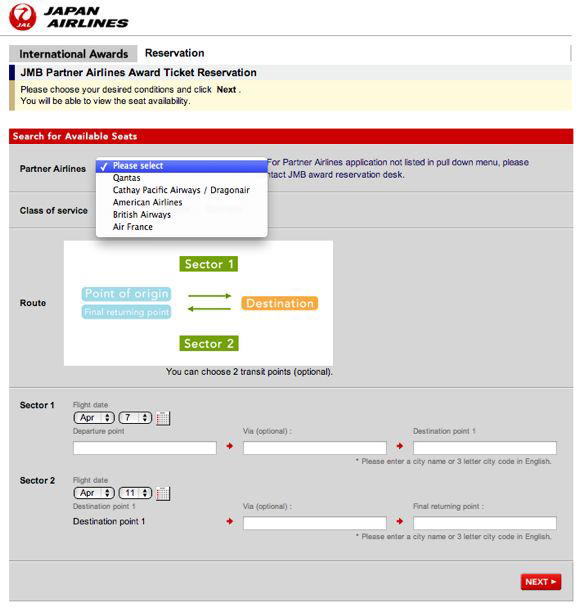
You can only search a single class of service at a time, and the system requires you to search for round-trip itineraries. It’s also worth noting that when you enter an origin or departure city you have to go to the drop down menu and select the full name of the airport. If you enter the three letter code and try to search you’ll get an error message.

The results page lists the required mileage and fees for tickets booked using Japan Airlines MileageBank miles. If you’re using any other mileage currency you can ignore this.
The second section shows flight availability on the selected dates. Flights with available award space will be selectable, while flights without award availability will be greyed out.
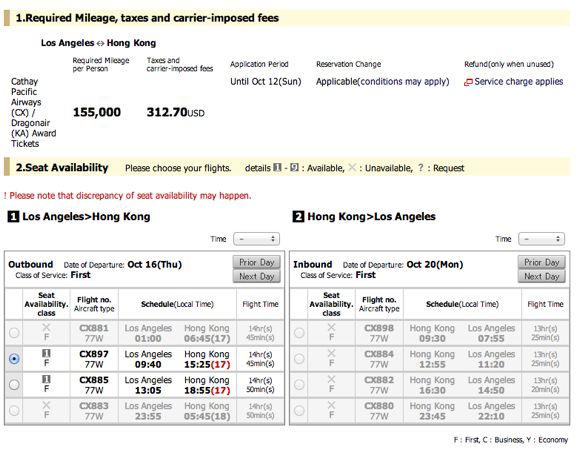
Another quirk of the JAL tool is that you don’t select the number of seats you’re looking for. Instead, to the left of each flight the cabin of service will be listed (F for First, C for Business, and Y for Economy), with the number of available award seats listed in a grey box just above.
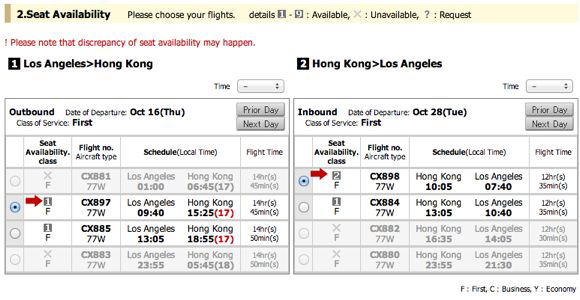
This availability should match what is available to other OneWorld partners, so you should be able to book this space over the phone. The JAL tool is probably more accurate than the British Airways site lately, so for the partners they display space for this is a good website for “verifying” space.


Membership is free and takes no more information than commenting as a guest. Earn status points for good contributions, and see fewer ads as your status grows.