
Banks and retailers have been combining forces more and more lately, in hopes of directing consumer spending. One of these tie-ups is Amazon Shop with Points, which allows customers to pay for purchases using their credit card rewards points.
The program was initially limited to American Express Membership Rewards, but has expanded to include Chase Ultimate Rewards and Citi ThankYou Points, so you may be participating in Shop with Points without realizing.

Now, this is a universally horrible value, and no one reading this blog should be using Shop with Points as a default. But reader bludevil had an experience with fraud on his Amazon account that is worth sharing:
…someone hacked into my Amazon account and bought a gift card. Since the payment options default to points, (I ALWAYS change this and have NEVER purchased anything on Amazon with points) the thief used my points to purchase the gift card.
Amazon noticed this was fraud and notified me immediately (kudos to them). They canceled the transaction and that should be that, right? WRONG! It has now been more than two weeks and I do not have the points back in my account yet. Amazon keeps telling me both on the phone and in emails that they canceled the order so everything should be OK. Finally I got someone to understand that I still do not have my points back, therefore I have paid for a fraudulent gift card purchase that I never made. At one point they offered me a $40 Amazon credit (which was the value of the card) which I declined because the points are much more valuable than that (almost 6,000!).
Ouch! It’s also interesting that 6,000 Amex points only bought a $40 gift card (that’s only .66¢ per point), but let’s stick to the main issue.
I haven’t had issues with fraud, but my mother’s Kindle is linked to my Amazon Prime account, and there have been many conversations about not using points to buy books, so I can certainly relate.
Disabling Shop with Points
I can’t remember if there was a bonus for linking Membership Rewards accounts to Amazon, or if Shop with Points was enabled by default when the program rolled out, but fortunately reader PhatMiles pointed out it’s easy to disable.
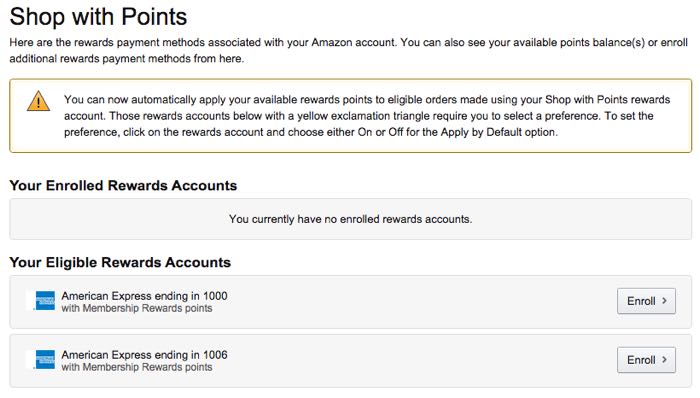
Sign in to your Amazon account, and then go to the Shop with Points management page:
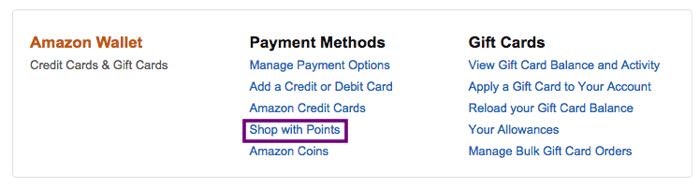
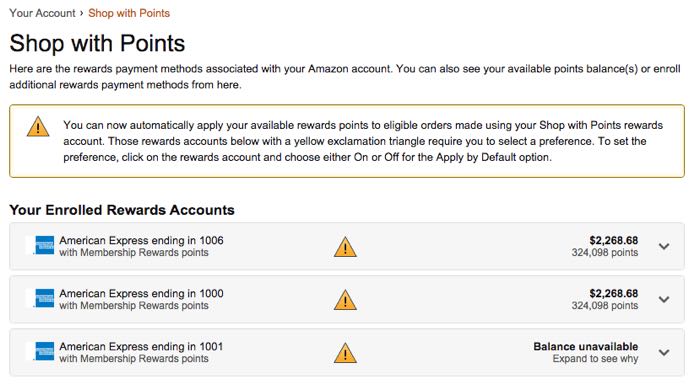
From there, you’ll see a list of any cards you have enrolled in Shop with Points, along with any cards that are potentially eligible.
In my case, my Membership Rewards cards were all enrolled, while my Ultimate Rewards and Citi ThankYou cards were just listed at the bottom:
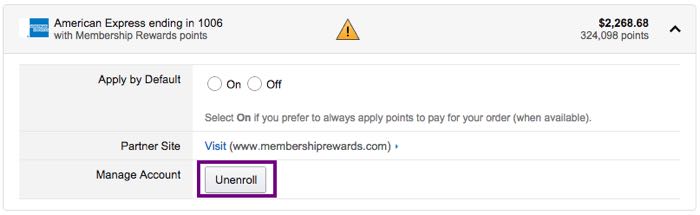
Select the dropdown for each card, and then you can choose to turn Shop with Points off by default, or just unenroll the card from the option entirely.
Even if you disable Shop with Points, the card will still be listed in your payment options.
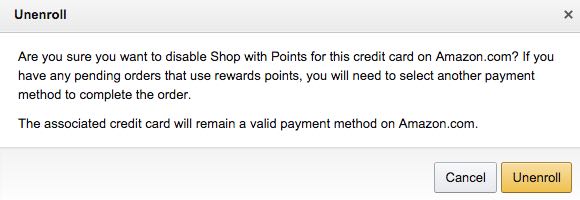
Once finished, the cards will still be listed as “eligible” for Shop with Points, so you can always enroll them later should you actually want to use points for an Amazon purchase (but please don’t do that).
Bottom line
I hadn’t considered the possibility of fraud, but I was always a little concerned that one of my family members would unwittingly use points for a purchase. Unlinking my cards took less than a minute, a I’m not sure why I haven’t done so before.
And please: there are so many phenomenal uses of American Express Membership Rewards points, please don’t redeem them for less than a penny apiece!
Has anyone else had issues with this? How did it get resolved?


Membership is free and takes no more information than commenting as a guest. Earn status points for good contributions, and see fewer ads as your status grows.